Asterisk monitoring and maintenance play a critical role in keeping call center systems reliable, responsive, and efficient. Without continuous oversight and proactive care, even a well-built Asterisk system can suffer from unexpected disruptions, performance issues, or service outages that damage customer trust.
Whether you’re running a small business PBX or a high-volume call center, having the right monitoring tools and maintenance strategies ensures smoother operations and fewer emergencies.
Why Asterisk Monitoring and Maintenance Matter
In every call center, uptime and call quality are non-negotiable. Since Asterisk often serves as the core of VoIP systems, monitoring and maintaining Asterisk directly impacts service reliability. A single overlooked issue—like high memory usage or SIP registration failures—can lead to dropped calls or prolonged downtime.
Fortunately, with the right approach, most of these problems are preventable. Investing in Asterisk monitoring and maintenance helps you detect issues early, respond quickly, and stay ahead of potential failures.
Key Asterisk Monitoring Tools
Let’s explore the most effective tools available for real-time insight and issue detection.
Nagios for Real-Time Alerts
Nagios remains one of the most trusted open-source monitoring platforms. With custom plugins for Asterisk, it can track active channels, call queues, and SIP trunk status. Alerts can be configured to notify your team before an issue affects end-users.
Zabbix with Asterisk Integration
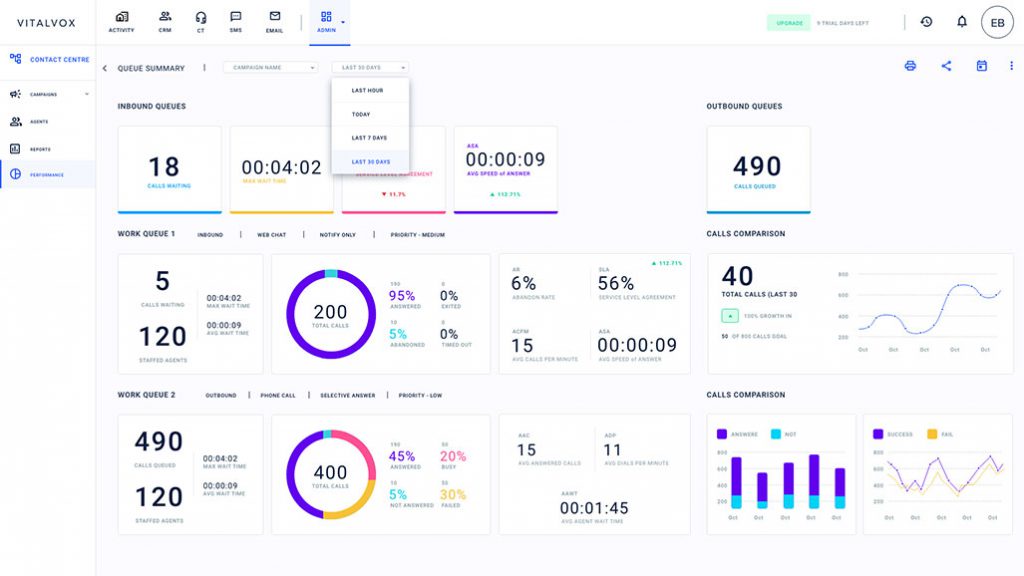
Zabbix offers a powerful interface and customizable dashboards. Through Asterisk templates, it provides detailed metrics such as concurrent calls, system CPU usage, and memory trends. As a result, teams can spot problems long before they escalate.
Monit for Process Management
Monit watches your Asterisk service and restarts it automatically if it crashes or becomes unresponsive. It’s lightweight and easy to configure, making it ideal for ensuring core processes remain stable.
HOMER for SIP Analysis
While basic monitoring checks the health of your system, HOMER helps you dig deeper into SIP signaling. It’s especially useful for diagnosing intermittent call issues, registration errors, and poor audio quality caused by network inconsistencies.
Maintenance Best Practices for Asterisk
Monitoring is only half the equation. Proactive maintenance ensures long-term performance and reduces emergency fixes.
Audit Configurations Regularly
Regular audits help eliminate misconfigurations or outdated settings. Reviewing your dial plan, extension logic, and security rules monthly or quarterly prevents many common problems.
Update Asterisk and Dependencies
Running outdated versions of Asterisk or its modules can lead to security risks and performance degradation. Always test updates in a staging environment before applying them to your live system.
Monitor Network and Audio Quality
Use tools like VoIPmonitor or PRTG to measure jitter, packet loss, and latency. These indicators often reveal problems before customers experience degraded audio or dropped calls.
Automate Backups and Failover
Backups should be automated and tested regularly. Moreover, implementing a failover system ensures continuity even if your primary Asterisk server fails.
Long-Term Strategies for System Stability
Beyond tools and updates, successful Asterisk monitoring and maintenance requires strategic planning:
-
Document every system change and update
-
Train support teams to recognize early warning signs
-
Schedule preventive maintenance during off-peak hours
-
Align monitoring alerts with team workflows (e.g., Slack, SMS, or email)
These habits reduce risk and create a culture of system resilience.
Frequently Asked Questions (FAQ)
1. What is Asterisk monitoring used for?
Asterisk monitoring allows you to track real-time system health, identify call quality issues, and respond to problems before they affect users.
2. How often should Asterisk maintenance be performed?
Most systems benefit from monthly audits and weekly system checks. Critical environments may require daily monitoring routines.
3. Can Asterisk monitoring be automated?
Yes. Tools like Nagios, Zabbix, and Monit can automate alerts, performance tracking, and even self-healing actions like service restarts.
4. What are common maintenance tasks in Asterisk?
Typical tasks include log rotation, call recording management, disk space monitoring, configuration updates, and software patching.
5. Why does call quality vary even when Asterisk is running fine?
Network issues such as latency or packet loss can affect voice quality. SIP analysis tools like HOMER help isolate these issues quickly.
Final Thoughts
A proactive approach to Asterisk monitoring and maintenance is essential for running a high-performing call center. By using reliable tools, performing regular maintenance, and adopting strategic practices, you can avoid unexpected downtime, improve customer experience, and reduce operational stress.
Don’t wait until an outage disrupts your operations—build a robust monitoring and maintenance plan today.
Contact Us
Is your call center ready for next-level reliability? Our experts specialize in Asterisk monitoring and maintenance services tailored to your unique environment.
Reach out now to book a free consultation and discover how we can keep your communications running smoothly.